
The 21-Day Challenge
Real money habits for your kids. Check in daily to qualify for the giveaway on October 15!
What is this?
Beebucks is my spin on my mom's paper "Bear Bucks" system. Kids earn for chores, then choose to spend, save, grow, or give it.
I'm asking friends, family, and others to complete a 21 day challenge to get feedback.
How it works
- Create your hive at mybeebucks.com.
- Tap "Start the challenge", then check in daily.
- Check in at least 21 days over a 30 day period to be entered in the giveaway.
The giveaway
To get an entry, complete 21 daily check-in questions inside the Beebucks app during a 30 day period. If you never miss a day, you get an additional entry.
Six winners will each receive a gift card or a donation to a cause of their choosing, ranging from $25 to $75 in value. Official rules
No purchase necessary. The free plan is enough to enter.
Put it on your home screen
It works like a regular app from there, and the daily check-in is one tap away.
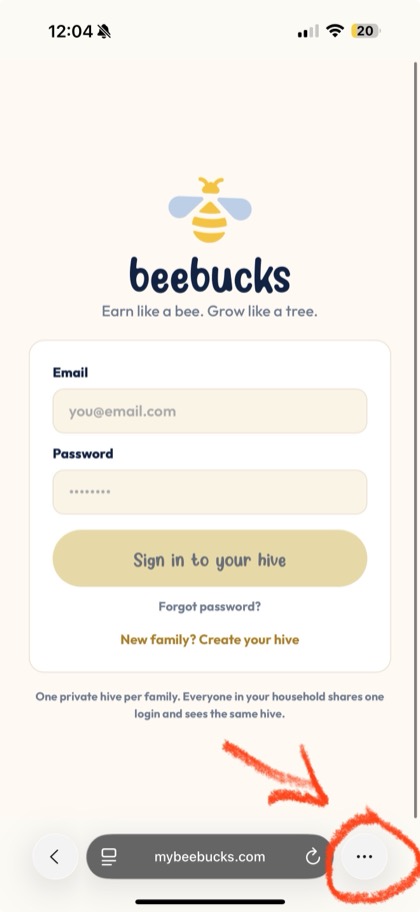
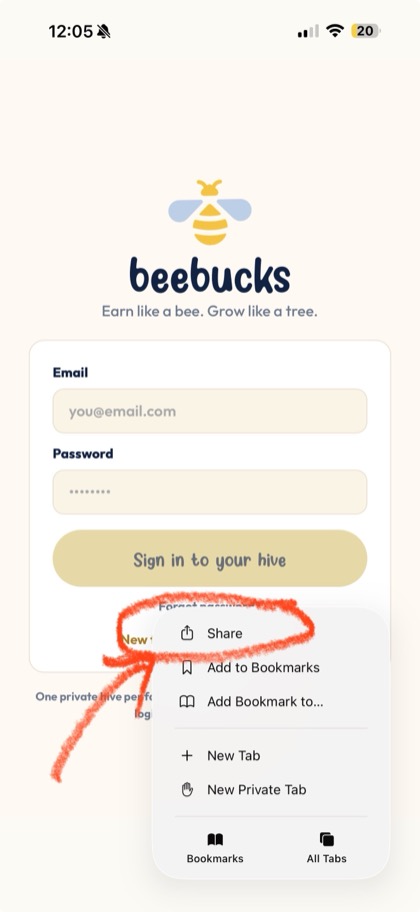
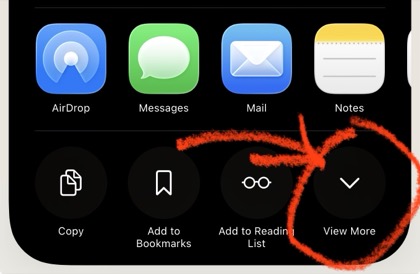
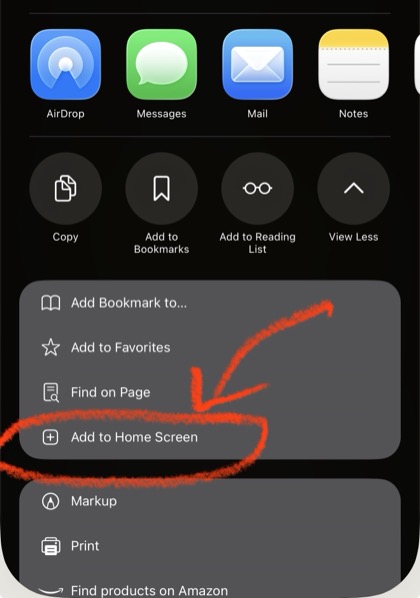
iPhone: open mybeebucks.com in Safari, then follow these four taps.
 1
1
Tap ⋯ by the address bar
 2
2
Tap Share
 3
3
Tap View More
 4
4
Tap "Add to Home Screen"
On some iPhones the Share button shows directly instead of step 1, and step 3 isn't needed.
Android: open mybeebucks.com in Chrome, tap the three dots, then "Add to Home screen."